Logic Flaws: Hijacking a Password Reset
Abusing an assumption in a password-reset flow to redirect a victim's reset email to an address I control.
Lab work from a TryHackMe web application security module, done against a deliberately vulnerable training app. Lab IPs are genericized and room answers are redacted. To see where I got this from, and to give it a try yourself, you can go to: TryHackMe | Authentication Bypass Task 4
TL;DR
A web endpoint lets users reset their password by supplying their email and username. Behind the scenes, the app verifies the two match before sending a reset link to that email. But by injecting a second email into the body of the request, we can make the app validate against the account’s email while sending the reset link to ours — handing us the victim’s reset link, and with it, their account.
What a logic flaw is
A logic flaw is when the normal, intended path through an application can be bypassed, circumvented, or manipulated. Unlike injection attacks, there’s no malicious payload being executed — the attacker just does something the developer assumed no one would, and the application’s own logic lets them through.
A simple illustration:
1
2
3
4
5
if ( url.substr(0,6) === '/admin' ) {
    # Code to check the user is an admin
} else {
    # View the page
}
This checks whether the path the client is visiting begins with /admin, and if so, runs the admin verification before continuing. Everything else just gets served. The flaw is the === comparison: it’s an exact, literal match, so /adMin is not equal to /admin. A user who requests /adMin skips the admin check entirely and still reaches the page — the logic did exactly what it was written to do, which wasn’t what the developer meant.
While the other attacks we studied work by abusing the actual input — injecting SQL into a login field, embedding malicious JavaScript in a comment for XSS, or modifying the cookies sent with a request — logic flaws instead target the application’s own logic and the false assumptions the developer baked into it. Rather than smuggling in a payload, we misuse legitimate features and break the assumptions the code relies on, turning the app’s intended behavior against itself.
Recon: mapping the reset flow
The lab target is the password-reset feature. The first step is just to use it as intended and learn its flow.
The reset form starts by asking for an account email:
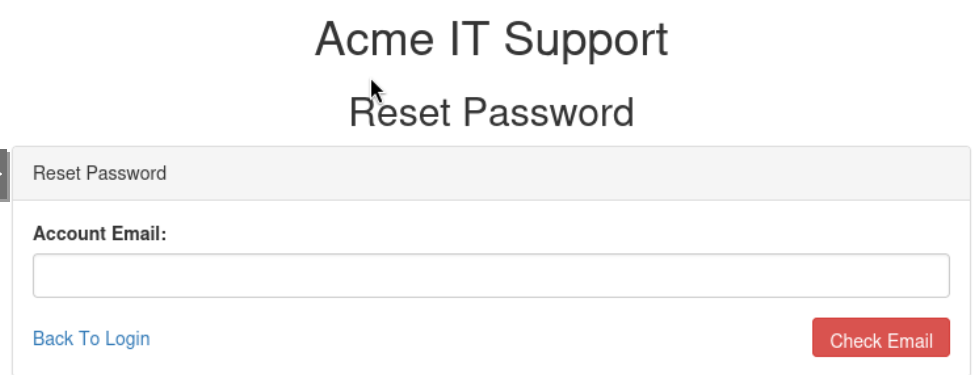 Step one: the reset form asks for the account’s email.
After submitting an email, it moves on to ask for the matching username:
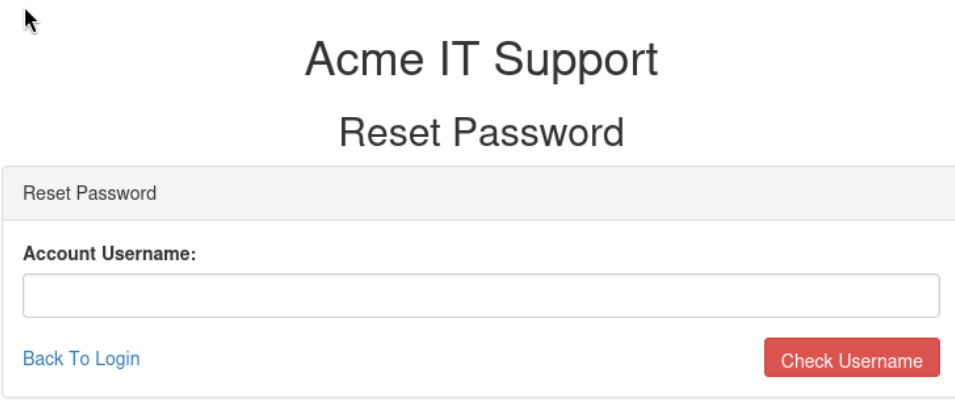 Step two: it then asks for the account username.
Going forward we’ll use the username robert and his email robert@acmeitsupport.thm, both gathered in earlier tasks. The username came from enumerating the signup page with FFUF — since no two accounts can share a username, any name that returned Already in Use was a valid account (I go deeper on that in my FFUF notes, coming soon). The lab hands us the matching email; in the real world you’d OSINT it from the username, or guess a company-standard format like first@acmeitsupport.thm.
Submitting a valid email and username confirms the flow — the app says it will send a reset link to the account’s email:
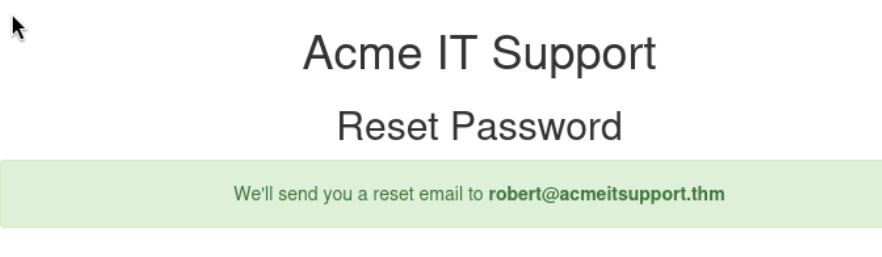 The app confirms it will send the reset to the account’s registered email.
Now we know the flow: email → username → reset link sent to the account’s email. The key assumption baked in here is that the destination email is fixed to the account.
Exploit: overriding the reset destination
With the flow understood, we can reproduce it with curl instead of the browser, which gives exact control over what we send. The email rides in the query string (taken from the URL after the email step) and the username in the POST body:
1
2
3
curl 'http://MACHINE_IP/customers/reset?email=robert%40acmeitsupport.thm' \
  -H 'Content-type: application/x-www-form-urlencoded' \
  -d 'username=robert'
The response echoes the address it intends to send to. The lab hints that we can try adding a second email value in the POST body, to see whether the app uses that to decide where the reset goes:
1
2
3
curl 'http://MACHINE_IP/customers/reset?email=robert%40acmeitsupport.thm' \
  -H 'Content-type: application/x-www-form-urlencoded' \
  -d 'username=robert&email=attacker@email.com'
 The response now shows the reset going to the attacker-supplied email instead of the account’s.
That’s the flaw: the reset is still for robert’s account, but the destination is whatever email we supply. The app never enforced that the email had to match the account it looked up.
From here we’ve essentially got the keys to the kingdom. Earlier we used a throwaway attacker@email.com just to prove the destination changes — but to actually take the account, you need an inbox you can read. Registering a customer account gives you exactly that: a @customer.acmeitsupport.thm inbox on their own mail system. Inject that address, trigger robert’s reset, and the link lands in your inbox instead of his. Follow it, set a new password, and you’re into his account — and because you registered as a customer but took over an employee account (@acmeitsupport.thm), you’ve escalated straight past the customer tier into staff-level access to pivot from.
How to detect it
Logic flaws are inherently hard to detect. Much like cookie tampering or IDOR, the system is doing exactly what it was programmed to do. The attacker just found a way to leverage that in their favor, in a way the developer did not intend.
That means, much like cookie tampering and IDOR, the clues are a bit harder to find, but we can look for behaviors that don’t match what is anticipated.
- Application logs. In the lab, the reset email went somewhere other than the account’s registered address. If the application logs these requests, you could flag any case where the reset destination doesn’t match the email on file for that user. The same logic applies more broadly: compare what’s expected against what actually happened. For emails specifically, you could also compare the destination domain and flag resets sent to unknown or external domains.
- WAF logs. Because a WAF can inspect both the headers and the body, it can catch duplicate parameters. In our attack we submitted a second
email=— one in the query string, one in the body. A WAF that spotted the duplicate, and specifically that the two values didn’t match, would have a strong signal that someone was trying to leverage a logic flaw.
How to fix it
Patching logic flaws takes a few approaches, addressing both the data-handling path and the underlying logic the application uses.
- Never trust user-supplied information. In the attack we used, it worked only because the app chose the reset destination from an input we supplied. Had the verification been performed against the supplied inputs and the reset been sent to the email stored in the server’s database, we would not have been able to inject our own. This holds regardless of any other flaws in the logic: if the reset link can only ever be sent to the email tied to the account in the DB, the attacker can’t redirect it.
- Reject duplicate or unexpected parameters. Our attack worked by injecting a second email parameter into the request sent to the server. Had the server dropped the request for containing “malformed” data, our takeover would not have been successful. In this case, malformed means any request that contains more data than it should, or duplicates of data that shouldn’t exist.
- Consistency in code. While this isn’t a perfect fix for logic flaws, being consistent in how you perform lookups, references, and conditional statements helps prevent them. At its core, our attack required the backend to use one email (the query email) to validate the request, but then switch to the email we supplied in the body for the delivery. This comes down to how the code references request parameters (
$_GETvs$_POSTvs$_REQUESTin PHP). Had it referenced the email consistently from a single source, it would have either used our injected email for both — failing verification — or used the account’s email for both, sending the reset to the real owner. Note this only removes the inconsistency, though; the first fix above removes the trust entirely, which is the stronger guarantee.
Takeaways
This is the first writeup I’ve done where there’s no real “malicious payload.” You’re basically misusing the application to force it into doing things it isn’t supposed to. In our case, we just modified a legitimate request to include extra information. None of it was malicious code, just an extra email address.
It also requires some level of reverse-engineering how an application runs. For something like SQLi, it’s just identifying when an input is run directly by the database and trying valid SQL syntax. Here, we need to figure out how the site handles the request we make, what steps it takes, and how we might break those steps in a way that benefits us.
It also stands out that despite being the most different attack I’ve studied so far, the core fix is essentially the same.
Do not trust the user’s input.